

Automated Digital Marketing: 7 Powerful Ecommerce Growth Tips
Automated digital marketing helps ecommerce businesses manage campaigns, connect with customers, and increase online sales without handling every task manually. From abandoned-cart reminders to personalised emails, automation makes marketing more organised and consistent.
For online stores, the real advantage is saving time while delivering relevant messages. With the right strategy, automated digital marketing can help businesses improve customer engagement, manage advertising campaigns, and build stronger relationships with shoppers.
1. What Is Automated Digital Marketing?
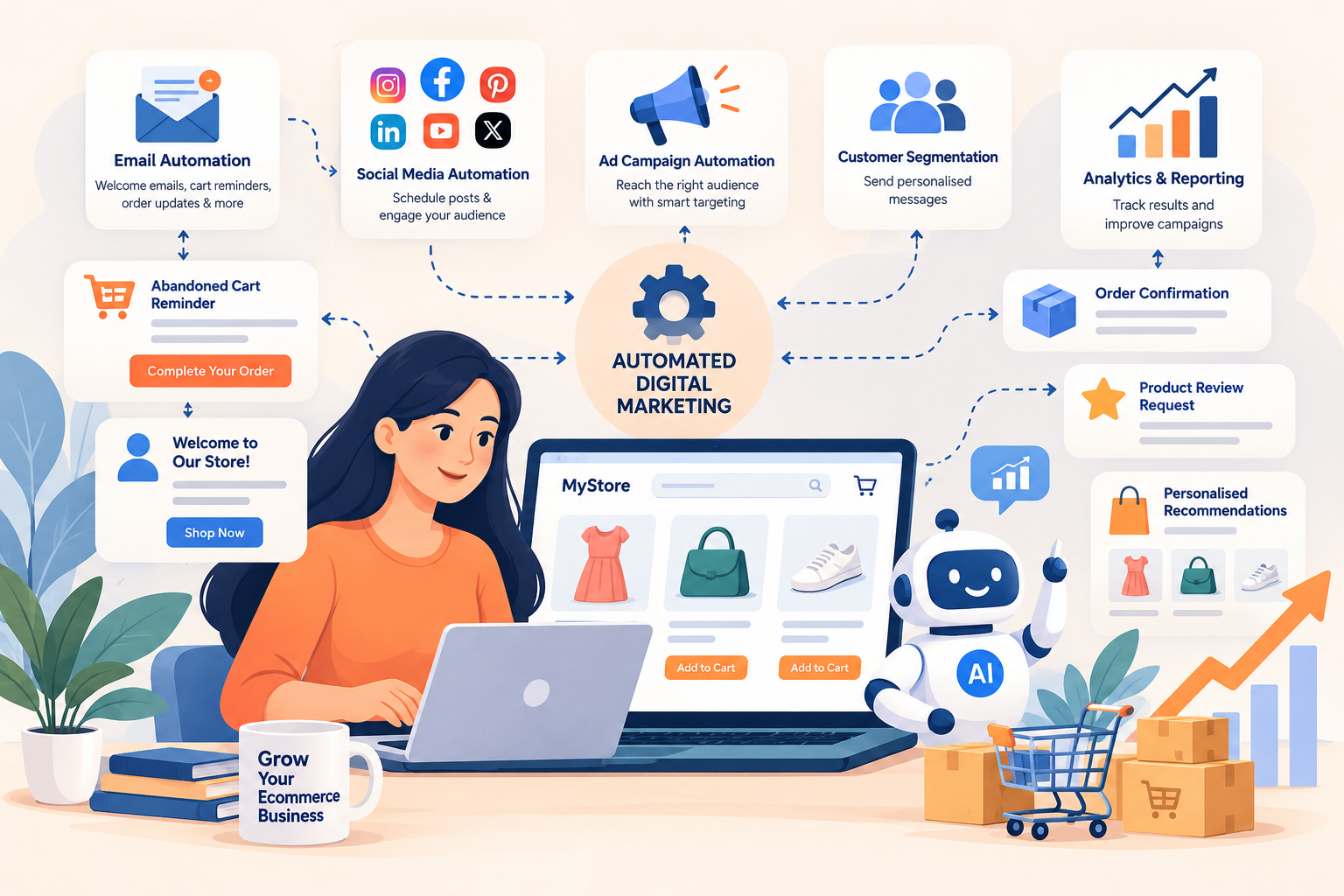
Automated digital marketing uses software and predefined rules to manage repetitive marketing activities. These activities include email campaigns, social media scheduling, customer segmentation, advertising workflows, and performance reporting.
Instead of manually contacting every customer, businesses can create workflows that respond to specific actions. For example, when someone subscribes to a newsletter, the system can automatically send a welcome email.
Why Ecommerce Businesses Need Marketing Automation
Running an online store involves managing products, orders, customer questions, promotions, and advertising. Handling every marketing activity manually can become difficult as the business grows.
Automated digital marketing helps simplify these tasks. It allows business owners to focus more on product quality, customer service, and business development.
For example, an online clothing store can send reminders to shoppers who leave products in their carts. It can also recommend related products to customers based on their previous purchases.
2. How Automated Digital Marketing Works
Automated digital marketing follows a simple process. A customer performs an action, the system identifies that action, and a predefined workflow delivers an appropriate response.
For example, a visitor subscribes to an ecommerce newsletter. The system sends a welcome email, introduces popular products, and may send another relevant message after a few days.
Common Marketing Automation Triggers
Triggers are events that start an automated workflow. These events help businesses deliver messages at relevant moments instead of sending identical promotions to everyone.
Common triggers include newsletter subscriptions, abandoned shopping carts, completed purchases, product browsing, and customer inactivity. Each trigger should connect to a clear marketing objective.
A Simple Ecommerce Example
Imagine a customer adds a pair of shoes to their shopping cart but leaves without completing the purchase. An automated system can send a reminder after an appropriate interval.
If the customer completes the purchase before the reminder is sent, the system should stop the abandoned-cart workflow. This simple condition prevents irrelevant messages and creates a better shopping experience.
3. Use Automated Email Marketing to Increase Sales
Email marketing remains a useful channel for ecommerce businesses because it allows brands to communicate directly with subscribers. Automated digital marketing makes these communications more consistent and relevant.
Businesses can prepare welcome emails, product announcements, order updates, and promotional campaigns in advance. The system then sends the appropriate message according to the selected schedule or customer action.
Welcome Email Automation
A welcome email introduces your brand to new subscribers. It can explain what your store sells, highlight popular products, and provide useful information about shipping or customer support.
Keep the message simple and relevant. Automated digital marketing works better when emails provide genuine value instead of immediately pushing customers toward another purchase.
Abandoned-Cart Email Automation
Many shoppers leave ecommerce websites without completing their orders. They may become distracted, compare prices, or reconsider their purchases.
An abandoned-cart email reminds shoppers about the products they selected. Include a clear checkout link and useful product information, but do not assume that every abandoned cart needs a discount.
Post-Purchase Email Automation
Customer communication should continue after an order is placed. Businesses can automate order updates, delivery information, product-care instructions, and review requests.
These messages help customers understand what happens next. They can also encourage repeat purchases when recommendations genuinely match the customer’s interests.
4. Automate Social Media Marketing for Your Online Store
Social media helps ecommerce businesses showcase products, share useful information, and build relationships with potential customers. However, publishing content manually every day can consume valuable time.
Automated digital marketing tools allow businesses to schedule posts in advance. Brands can prepare product demonstrations, seasonal promotions, educational content, and customer testimonials using a content calendar.
Create a Consistent Posting Schedule
Start by identifying the platforms where your customers spend their time. Choose a realistic posting frequency that your team can maintain without sacrificing content quality.
Schedule posts around product launches, festivals, special offers, and useful shopping advice. Review engagement regularly to understand which topics attract meaningful interest.
Keep Human Interaction in the Process
Scheduling posts does not mean every social media interaction should be automated. Customers may ask about product sizes, delivery times, returns, or payment problems.
These questions often need personalised answers. Use automated digital marketing for repetitive publishing tasks while allowing people to handle customer conversations that require judgement.
5. Improve Advertising Campaigns With Automation
Paid advertising can help ecommerce businesses reach potential customers across search engines and social platforms. Advertising automation can support campaign delivery, bidding, audience management, and performance reporting.
However, automated digital marketing cannot guarantee profitable advertising results. Campaign performance still depends on product demand, creative quality, targeting, pricing, landing pages, and accurate conversion tracking.
Set Clear Advertising Goals
Before launching a campaign, decide what you want to achieve. Your objective might be increasing purchases, generating qualified leads, or attracting relevant visitors to a product category.
Choose metrics that match your objective. An ecommerce campaign should generally be evaluated using purchases, conversion rates, customer acquisition costs, and profitability rather than clicks alone.
Monitor Spending and Conversion Data
Automation tools may adjust campaign settings based on the information they receive. If conversion tracking is incorrect, the system may optimise for misleading results.
Check your tracking setup before increasing the advertising budget. Review spending regularly and pause campaigns that consistently fail to meet reasonable performance targets.
6. Personalise Customer Experiences With Automation
Customers have different interests, budgets, and shopping habits. Sending the same promotion to every subscriber can make marketing less relevant and increase the likelihood of unsubscribes.
Automated digital marketing allows ecommerce businesses to organise customers into groups. These groups can be based on purchase history, product interests, customer status, or previous engagement, where appropriate consent and data are available.
Segment Customers Into Relevant Groups
A store might separate first-time buyers, repeat customers, inactive subscribers, and shoppers interested in specific product categories. Each group can receive communication suited to its needs.
For example, a customer who regularly purchases skincare products may appreciate relevant product recommendations. A first-time buyer may benefit more from information about shipping, returns, and product usage.
Recommend Products Carefully
Personalised recommendations can help shoppers discover relevant products. They may be based on previous purchases, browsing activity, or products commonly purchased together.
Avoid recommending products customers have already purchased when a complementary item would be more useful. Automated digital marketing should improve the shopping experience rather than make customers feel constantly monitored.
7. Measure Automated Digital Marketing Performance
Marketing automation is useful only when it supports meaningful business results. Sending thousands of emails or publishing dozens of posts does not automatically translate into more revenue.
Businesses should track conversion rates, repeat purchases, abandoned-cart recovery, customer acquisition costs, advertising returns, and campaign expenses. These metrics help identify which activities deserve further investment.
Track the Metrics That Matter
Email campaigns can be measured through clicks, conversions, revenue per recipient, and unsubscribe rates. Advertising campaigns can be evaluated through cost per acquisition, conversion rates, and return on advertising spend.
Remember that attributed revenue does not always represent additional revenue caused by a campaign. Some customers may have purchased even without receiving a promotional message.
Test and Improve Campaigns
Test different subject lines, calls to action, messages, and sending schedules. Change one important element at a time whenever practical, so you can better understand what influenced the results.
Review campaign performance regularly. Automated digital marketing should evolve as customer behaviour, product availability, and business objectives change.
How to Automate Digital Marketing Step by Step
You do not need an expensive collection of tools to begin. Start with one repetitive task and build a reliable workflow before expanding your automation setup.
Step 1: Identify Your Biggest Marketing Problem
Choose a task that consumes time or causes missed opportunities. For a small ecommerce store, this might be welcome emails, abandoned-cart reminders, or social media scheduling.
Step 2: Select Suitable Automation Tools
Choose software that integrates with your ecommerce platform and existing marketing channels. Compare pricing, workflow features, reporting, integration support, and subscription limits before making a decision.
Step 3: Create and Test a Workflow
Define the trigger, audience, message, timing, and conditions that stop the workflow. Test the complete customer journey before enabling automated messages for your entire audience.
Step 4: Measure Results and Improve
Track conversions, costs, engagement, and customer feedback. Expand automated digital marketing gradually when your initial workflow produces reliable results.
Best Tools for Automated Digital Marketing
The best automation tool depends on your store size, budget, and business requirements. Email platforms can manage subscriber communication, while social media tools can schedule posts and organise publishing calendars.
Ecommerce integrations can support abandoned-cart recovery and post-purchase messages. Advertising platforms can automate selected campaign settings, while analytics tools help measure website traffic and conversions.
Choose Tools That Work Together
Before purchasing multiple subscriptions, check whether your tools can exchange the information they need. Poor integrations can create duplicate messages, inaccurate reports, and unnecessary manual work.
A small store may need only an email marketing platform, a social scheduling tool, and reliable analytics. More advanced systems can be added when order volume and business requirements justify the additional cost.
Common Automated Digital Marketing Mistakes
Automation can save time, but poorly designed workflows can create new problems. Businesses should avoid sending too many messages, using outdated promotions, or delivering identical offers to every customer.
Another common mistake is relying on inaccurate conversion tracking. Incorrect data can lead businesses to invest in campaigns that appear successful but produce little genuine value.
Do Not Ignore Customer Privacy
Collect customer information responsibly and follow applicable privacy requirements. Use appropriate consent practices, protect customer records, and provide clear ways for recipients to manage their marketing preferences.
Do Not Automate Everything
Some situations require human judgement. Customer complaints, complicated delivery problems, and sensitive service issues often need a real person rather than another automated message.
Use automated digital marketing to handle predictable tasks. Keep people involved in strategy, creative decisions, customer support, and performance reviews.
How DigiBrandUp Can Support Ecommerce Growth
Growing an online store involves more than advertising. Businesses also need a clear website structure, useful product pages, a smooth checkout experience, and marketing activities that support their commercial goals.
Visit DigiBrandUp to explore digital solutions for business growth. You can also review DigiBrandUp’s ecommerce services for more information about ecommerce-focused support.
Automated digital marketing can complement these efforts by organising customer communication and improving campaign management. However, the results still depend on the store’s products, customer experience, strategy, and execution.
External Resource for Email Marketing
Google’s email sender guidelines explain important requirements for sending emails reliably. Businesses should review the latest guidance before launching large-scale email campaigns.
Following appropriate sender requirements can help protect email deliverability. Marketing messages should also respect customer preferences and include the required unsubscribe options.
Frequently Asked Questions About Automated Digital Marketing
What Is Digital Marketing Automation?
Digital marketing automation uses software to perform marketing tasks according to predefined rules and customer actions. Examples include welcome emails, abandoned-cart reminders, scheduled social media posts, and customer segmentation.
Automated digital marketing helps businesses save time and organise customer communication. It still requires useful content, accurate data, and regular monitoring.
1. How to Automate Digital Marketing?
Start by selecting one repetitive task, such as sending welcome emails or recovering abandoned carts. Choose a suitable tool, create the workflow, and test it before launching.
Measure conversions, costs, and customer responses. Expand your automated digital marketing activities only when the initial workflow performs reliably.
2. Can Digital Marketing Be Automated?
Yes, many marketing activities can be automated, including email sequences, social media scheduling, selected advertising tasks, and reporting. These tools reduce repetitive work and help businesses maintain consistent communication.
However, strategy, creativity, customer relationships, and complex decisions still need human involvement. Automation works best when software and people handle the tasks they are suited for.
3. What Is Automation in Digital Marketing?
Automation in digital marketing means using technology to complete marketing tasks automatically when specific conditions are met. For example, an ecommerce store can send a reminder after a shopper abandons a cart.
This approach makes marketing workflows more consistent and measurable. Businesses should still review messages, customer consent, and campaign results.
4. Will Digital Marketing Be Automated?
Digital marketing will likely become more automated as software improves. Repetitive tasks such as scheduling, reporting, audience organisation, and selected advertising decisions can already be automated.
Human skills will remain important for strategy, creative direction, customer understanding, and ethical decision-making. Automation is a tool for improving marketing work, not a replacement for every marketer.
Conclusion
Automated digital marketing helps ecommerce businesses manage campaigns, improve customer communication, and reduce repetitive work. Start with one clear workflow, measure its results, and expand gradually. Consistent testing, relevant content, and human oversight remain essential for sustainable online growth.